How to create a WhatsApp QR code
Atualizado em 20 de setembro de 20266 min de leitura
Artigo em inglês
Este guia ainda não está traduzido para o seu idioma, por isso está a ler a versão inglesa.
A WhatsApp QR code is a normal QR code carrying a click-to-chat link. Scanning it opens WhatsApp on your number with an optional first message already in the text box — no contact to save, no number to type, no app to install. It is the fastest way to turn a printed surface into a conversation, and it works identically on iPhone and Android.
What the code actually contains
There is no special "WhatsApp" QR format. The code holds a link in WhatsApp's official click-to-chat shape — wa.me followed by your number in digits, and optionally a text parameter with the pre-filled message. Any camera app can read it; the phone then hands the link to WhatsApp.
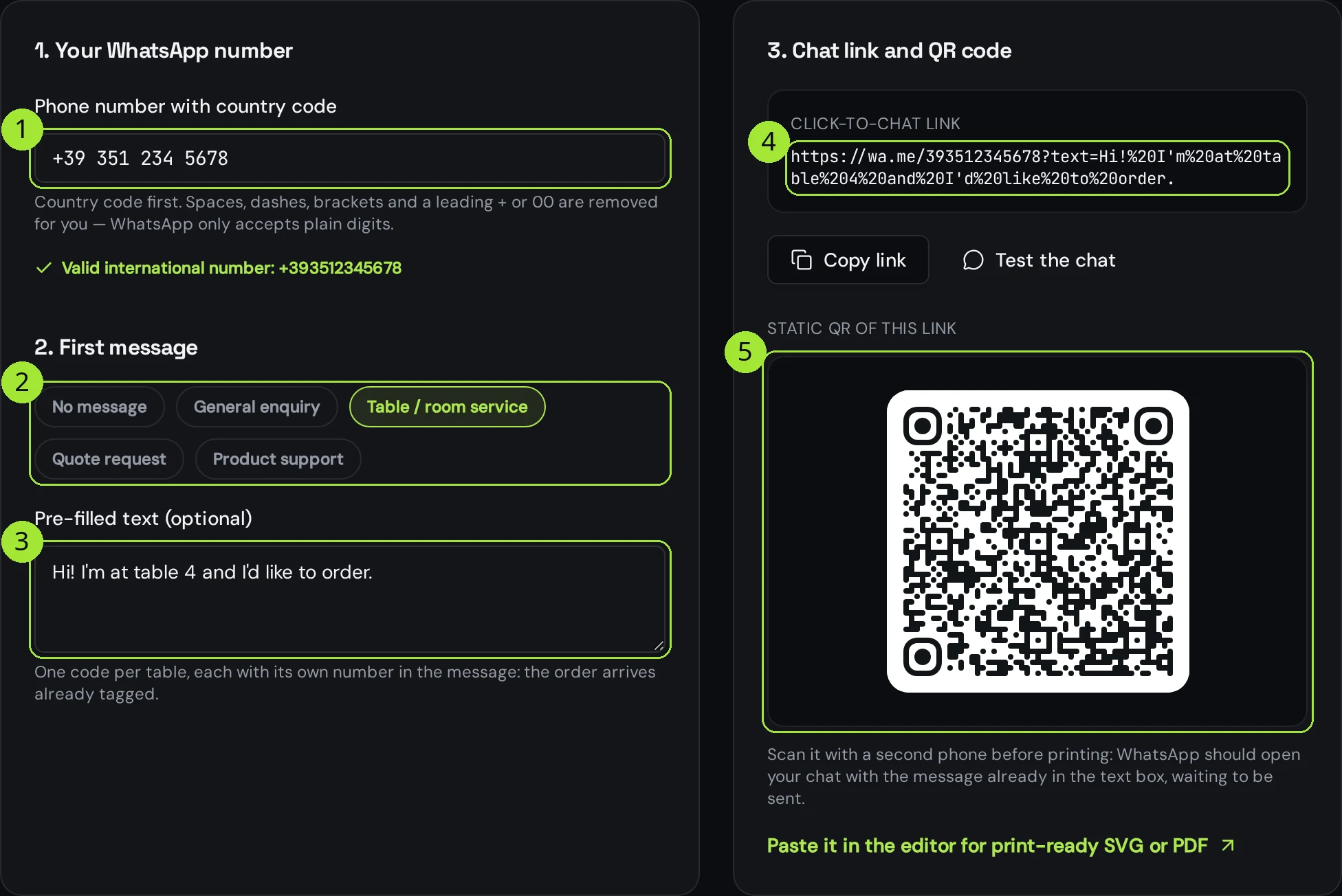
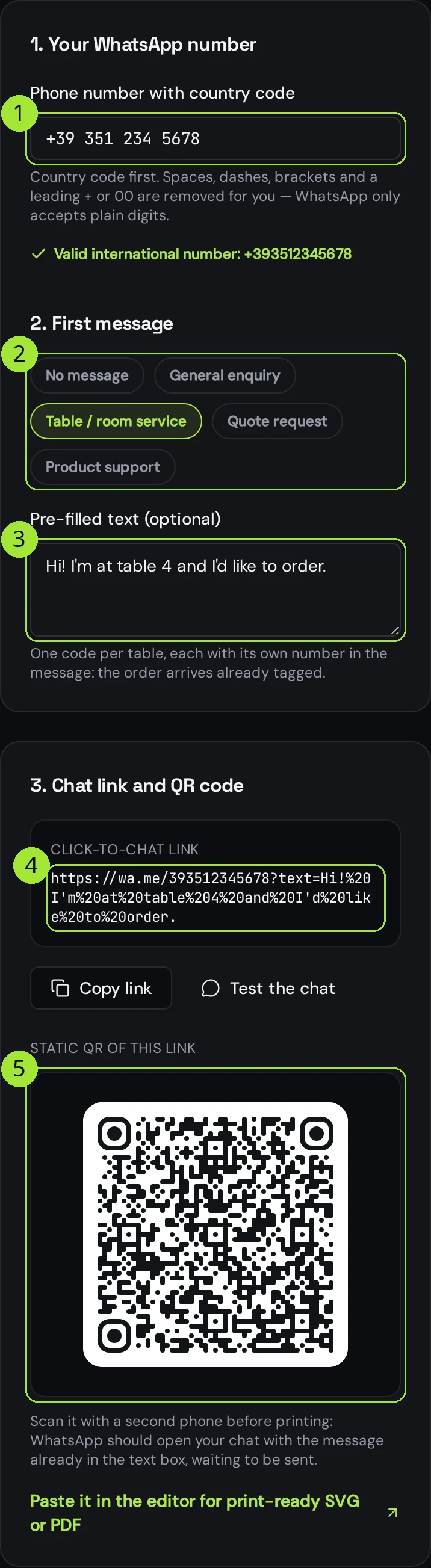
https://wa.me/393512345678?text=Hi!%20I'm%20at%20table%204Write the number the way WhatsApp expects
This single step is responsible for nearly every WhatsApp code that opens a dead end. WhatsApp reads the digits literally: country code first, then the subscriber number, with no plus sign, no zeros, no spaces and no brackets. It does not know which country you are in, so a local number is looked up as if it belonged to some other country — and usually does not exist there.
| What you type | What WhatsApp receives | Result |
|---|---|---|
| 351 234 5678 | 3512345678 | Fails — no country code, WhatsApp guesses wrong |
| 0351 234 5678 | 03512345678 | Fails — the trunk zero is not used internationally |
| +39 351 234 5678 | 393512345678 | Works — the + and spaces are stripped for you |
| 0039 351 234 5678 | 393512345678 | Works — 00 is read as the international prefix |
Paste the number in whatever shape you have it in the generator: the + sign, the 00, spaces, dashes and brackets are removed for you, and the number is validated as you type. A leading zero after the country code is flagged, because in most of Europe that zero is dropped in international format.
Use the pre-filled message as your tracking
WhatsApp tells you nothing about where a conversation came from. No referrer, no campaign, no page. The pre-filled message is the only context you get — so write it as a label, not as a greeting. One code per table, per shelf, per leaflet, each with its own wording, and the incoming chat identifies itself.
| Where it is printed | Pre-filled message | Why |
|---|---|---|
| Table tent, restaurant | Hi! I'm at table 4 and I'd like to order. | The order arrives already tagged with the table |
| Shelf label, retail | Hi! Is the Aurora lamp in stock? | You learn which product drove the message |
| Van, shop window | Hi! I'd like a quote. My project is: | Ends on a colon, so the person keeps typing |
| Packing slip | Hi! I need help with my order. Order number: | Collects the order number before a human reads it |
| Business card | (none) | A card is a person, not a campaign — an empty chat is fine |
Static or dynamic?
A static code carries the wa.me link inside the image. It is free, unlimited and works forever — but the number and the message are frozen in the print. Change either one and every printed copy is waste.
- Business card, a single table tent, a one-off flyer: static is the right answer.
- Hundreds of table tents, a shop network, a vehicle fleet: dynamic, so you can switch number or wording later without reprinting.
- You want to know how many people scanned, from which city and on which day: dynamic, because a static code has nothing to count.
- You are moving from a personal number to a Business number soon: dynamic, always.
A dynamic code keeps the printed image fixed and lets you edit the destination in your dashboard, which for WhatsApp means the number, the pre-filled text, or a redirect to a landing page if you later decide chat is not the right channel.
Download a file that prints cleanly
PNG is fine for a screen, a chat or a slide. For paper, choose SVG or PDF: both stay sharp at any size, and the PDF comes out at the exact physical width you pick, with the safety margin already included. Keep the code at 25 mm or wider for a table tent read at arm's length, and leave the quiet zone around it clear — a pre-filled message makes the link longer, which makes the pattern denser and less forgiving when printed small.
Test it before you print anything
- Scan the on-screen code with a second phone, using the plain camera app rather than a QR reader.
- Confirm WhatsApp opens on the right account and the message is in the box, unsent.
- Repeat on the other platform — one iPhone, one Android — because the link is handed over differently on each.
- Print one copy at the real size and scan it under the actual lighting: a laminated table tent behind a candle is not the same as a screen.
Perguntas frequentes
- Can I create a WhatsApp QR code for a group?
- Yes, but not from a phone number. Open the group, tap Invite via link, copy the invite link and turn that link into a QR code. Anyone who scans it can join, so treat it as public: reset the link in WhatsApp when you no longer want new members.
- Why does my code open a chat with an unknown number?
- The digits in the link are not the digits you meant. The usual cause is a missing country code or a trunk zero left after it, which turns your number into a different one. Paste the number again and check the validated form shown under the field.
- Does the pre-filled message appear in my chat too?
- Only once the person sends it. Until then you see nothing: the text lives on their phone, in the message box. That is also why you cannot use it to send an automated first reply.
- Can I count how many people scanned it?
- Not with a static code — the phone goes straight to WhatsApp and nothing of yours is in the middle. Use a dynamic code: the scan is logged with date, country, city and device, then redirected to WhatsApp in the same instant.
- Is a wa.me link safe to print, or will it stop working?
- wa.me is WhatsApp's own official click-to-chat domain and has been stable for years. The risk is not the domain, it is your number: if you ever change it, a static printed code is dead. That is the argument for dynamic on anything printed at volume.
Próximos passos
- Static or dynamic: which QR code do you need?One decision decides whether you can fix a mistake after printing. Here is how to make it in thirty seconds.
- Change where a printed QR code pointsThe single feature people buy dynamic codes for: update the link, keep the print.
- What size should a QR code be for print?The short answer is one tenth of the reading distance — but payload length, quiet zone and file format decide whether that size actually scans. Here is the full method, with a print-ready export at the end.
Guias aprofundados
- Static vs dynamic QR codes: the definitive guideThe difference isn't a marketing tier, it's a difference in what is physically encoded in the pixels — and it decides whether you can ever change the destination.
- QR code or short link? When to use whichA QR code is a transport for a string and a short link is a redirect service — knowing the difference tells you which one belongs on which channel.
- How to print QR codes: size, format and best practicesPrinting a QR code is not just about dropping a PNG into a layout. Format, size, contrast and material all decide whether the code scans reliably.