How to read a QR code from an image or screenshot
Atualizado em 20 de setembro de 20265 min de leitura
Artigo em inglês
Este guia ainda não está traduzido para o seu idioma, por isso está a ler a versão inglesa.
Someone sends you a QR code and you need to know where it goes — before you print 2,000 flyers with it, or before you trust it. Pointing your phone at your own screen is awkward and often fails. Decoding the image directly takes a few seconds and shows the full payload, character for character.
Drop the image into the reader
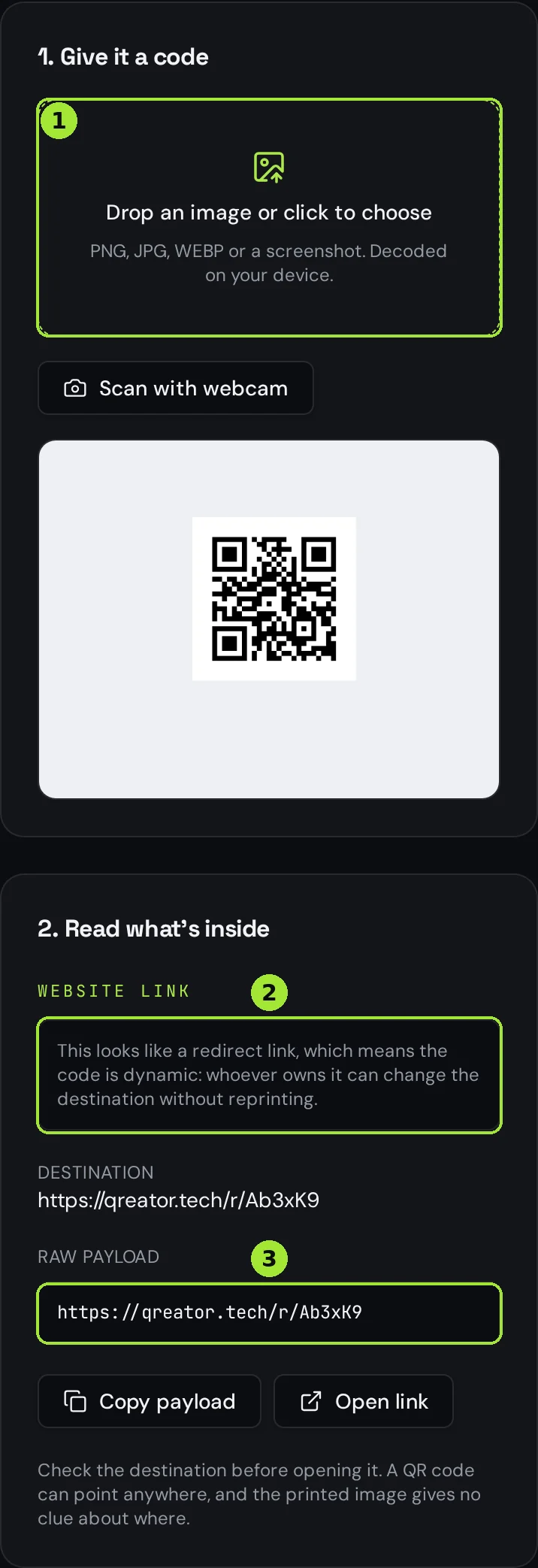
Open the free QR code reader and drop the file into the box, or click it to pick a file. The image is drawn onto a canvas and decoded by your browser: nothing is uploaded, so there is no copy of the code, the poster or the contact card sitting on a server afterwards.
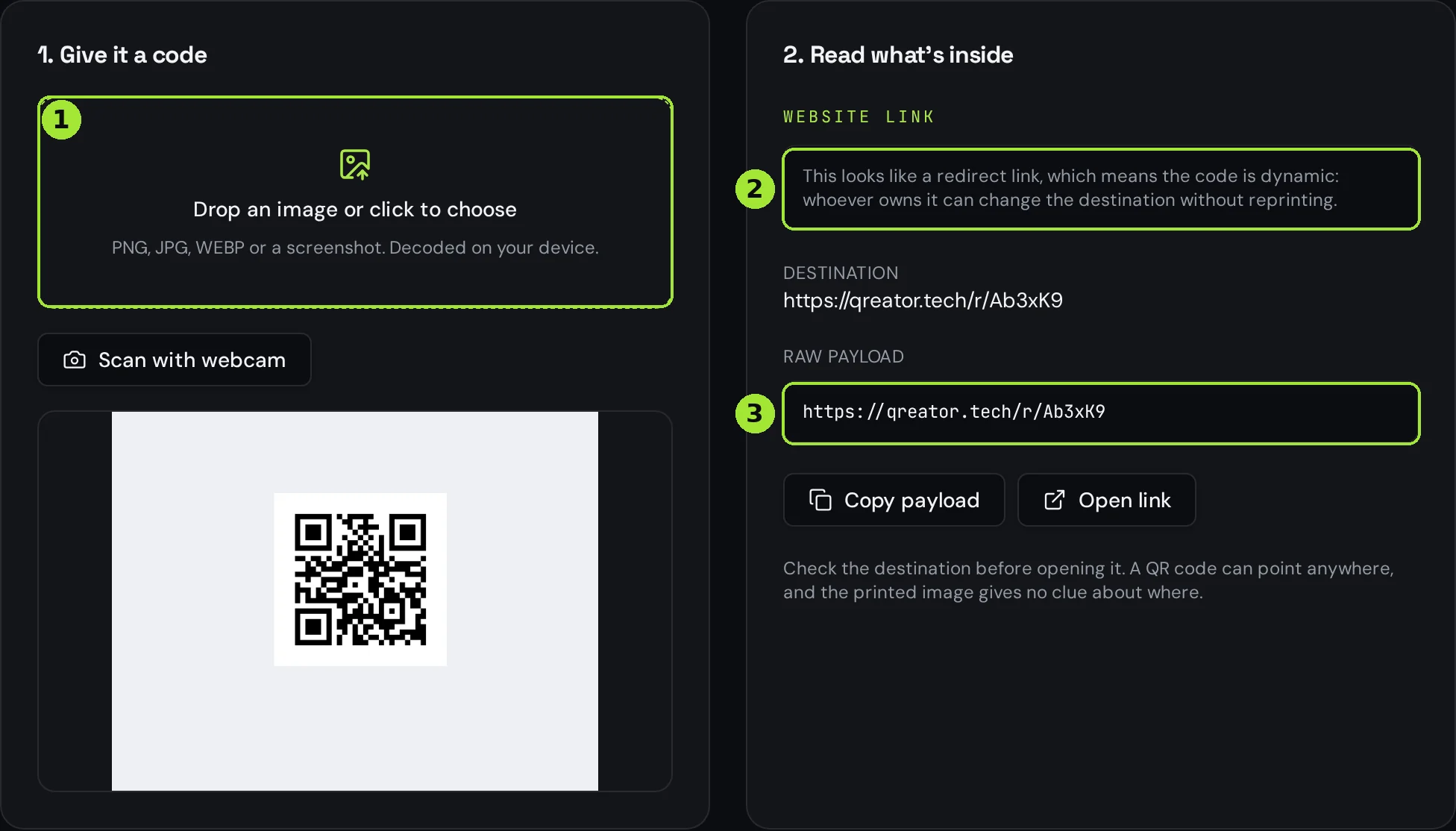
If the code is printed on something in front of you — a menu, a parcel, a letter — use "Scan with webcam" instead. The reader keeps sampling frames until it finds a code, then stops the camera on its own.
Read the payload, not just the link
The panel on the right splits what it found into readable fields, then shows the raw payload underneath. That distinction matters: a QR code can hold a Wi-Fi network with its password, a contact card, a phone number, a plain text note or a link with a long tail of tracking parameters. The raw box is the ground truth — it is what a phone actually receives.
- A link ending in ?utm_source=... is being tracked; the parameters tell you by whom and for which campaign.
- A Wi-Fi payload shows the network name, the security type and the password in clear text — which is why you never encode the till network.
- A contact card shows every field that will land in the phone's address book, including the ones the designer forgot to fill in.
- Plain text means the code opens nothing at all: it just displays the text.
Tell whether the code is static or dynamic
If the payload is a short redirect link on a QR provider's or shortener's domain, the code is dynamic: its owner can change where it points at any time, and probably counts every scan. The reader flags this for you. If the payload is the final, full URL — or raw text, a contact card, a Wi-Fi network — the content is baked into the grid and can never be changed.
This is the fastest way to audit a code you inherited. A supplier's "permanent" menu code that turns out to be a redirect on someone else's account is a code you don't control: if that account lapses, your printed menus stop working.
When it won't decode
| What you have | Works? | What to do |
|---|---|---|
| PNG, JPG or WEBP file | Yes | Drop it in as it is |
| Screenshot of a page or e-mail | Yes | Crop around the code if the code is small in the frame |
| Photo of a poster or menu | Usually | Hold the phone flat, avoid glare, crop tightly |
| PDF or vector file | Not directly | Take a screenshot of the code, or export it as PNG first |
| Printed code in your hand | Yes | Use the webcam button instead of uploading |
Almost every failure is one of four things: the code fills too little of the image, the photo is blurry, there is glare across the modules, or the code was printed with too little contrast. Crop tightly around the code and try again — the reader already retries at several scales before giving up.
Perguntas frequentes
- Is the image uploaded anywhere?
- No. The file is drawn onto a canvas in your browser and decoded locally with JavaScript. Nothing reaches Qreator's servers, so there is no copy to delete.
- Can I read a QR code that is inside a PDF?
- Not directly. Open the PDF, zoom in on the code and take a screenshot, then drop that screenshot into the reader. A tight crop around the code decodes most reliably.
- Why does my photo of a poster fail?
- Usually blur, glare or a code that fills too little of the frame. Hold the phone parallel to the surface, avoid direct light on the code, crop tightly and try again.
- Can I tell who owns a dynamic code?
- You can see the domain the redirect runs through, which identifies the provider, but not the account behind it. If you need control of the code, create your own dynamic code and print that instead.
- Does reading a code count as a scan in someone's analytics?
- Decoding the image does not: nothing is requested from the destination. Clicking "Open link" does open the redirect, and that will be logged by whoever owns the code.
Próximos passos
- Your QR code will not scan: the checklistWork down this list in order — the first three causes account for most failures we see.
- Static or dynamic: which QR code do you need?One decision decides whether you can fix a mistake after printing. Here is how to make it in thirty seconds.
- What size should a QR code be for print?The short answer is one tenth of the reading distance — but payload length, quiet zone and file format decide whether that size actually scans. Here is the full method, with a print-ready export at the end.
Guias aprofundados
- Why QR codes stop working (and how to avoid it)Most "broken" QR codes are fine — the destination behind them, or the print job around them, is what actually failed.
- Static vs dynamic QR codes: the definitive guideThe difference isn't a marketing tier, it's a difference in what is physically encoded in the pixels — and it decides whether you can ever change the destination.
- QR code or short link? When to use whichA QR code is a transport for a string and a short link is a redirect service — knowing the difference tells you which one belongs on which channel.