How to create a QR code for a PDF file
Updated September 20, 20266 min read
A QR code holds a few thousand characters at most — a PDF is thousands of times bigger than that. So no generator encodes the document itself: it encodes a link to a copy of the document on the web. Everything that goes right or wrong afterwards depends on which link you choose.
Step 1: put the PDF somewhere a phone can open it
The file needs a public web address. If your site already has one — yourdomain.com/menu.pdf — use it. If it doesn't, create a hosted page on Qreator and add a file block: you upload the PDF (up to 20 MB), the file is stored privately and served through a signed link, and visitors get a clean page with a button to open or download it. Dropping a Drive or Dropbox share link into a code works, but your customer usually lands on a preview screen or a sign-in wall first, which is where scans get abandoned.
| Where the file lives | Opens cleanly on a phone? | Can you replace the file? |
|---|---|---|
| A hosted page on Qreator (file block, up to 20 MB) | Yes, one tap to open or download | Yes — upload a new file, same code |
| Your own website or CDN | Yes | Yes, if you keep the same file name |
| Google Drive / Dropbox share link | Often a preview or sign-in wall first | Only if the sharing link never changes |
| E-mail attachment | No link to encode at all | No |
Step 2: decide whether the code must stay editable
If you encode the file address directly, the code is static: it will point at that exact URL forever. That is fine for a document that never moves, like a one-off event programme. For anything you will reissue — a menu, a tariff sheet, a product manual — use a dynamic code instead. A dynamic code redirects through Qreator, so you can send it to a different file or a different page later, and you see how many people actually scanned it, when and from where.
The difference costs nothing at print time and everything afterwards. A static code on 5,000 printed menus is a reprint the day the file name changes.
Step 3: generate the code from the link
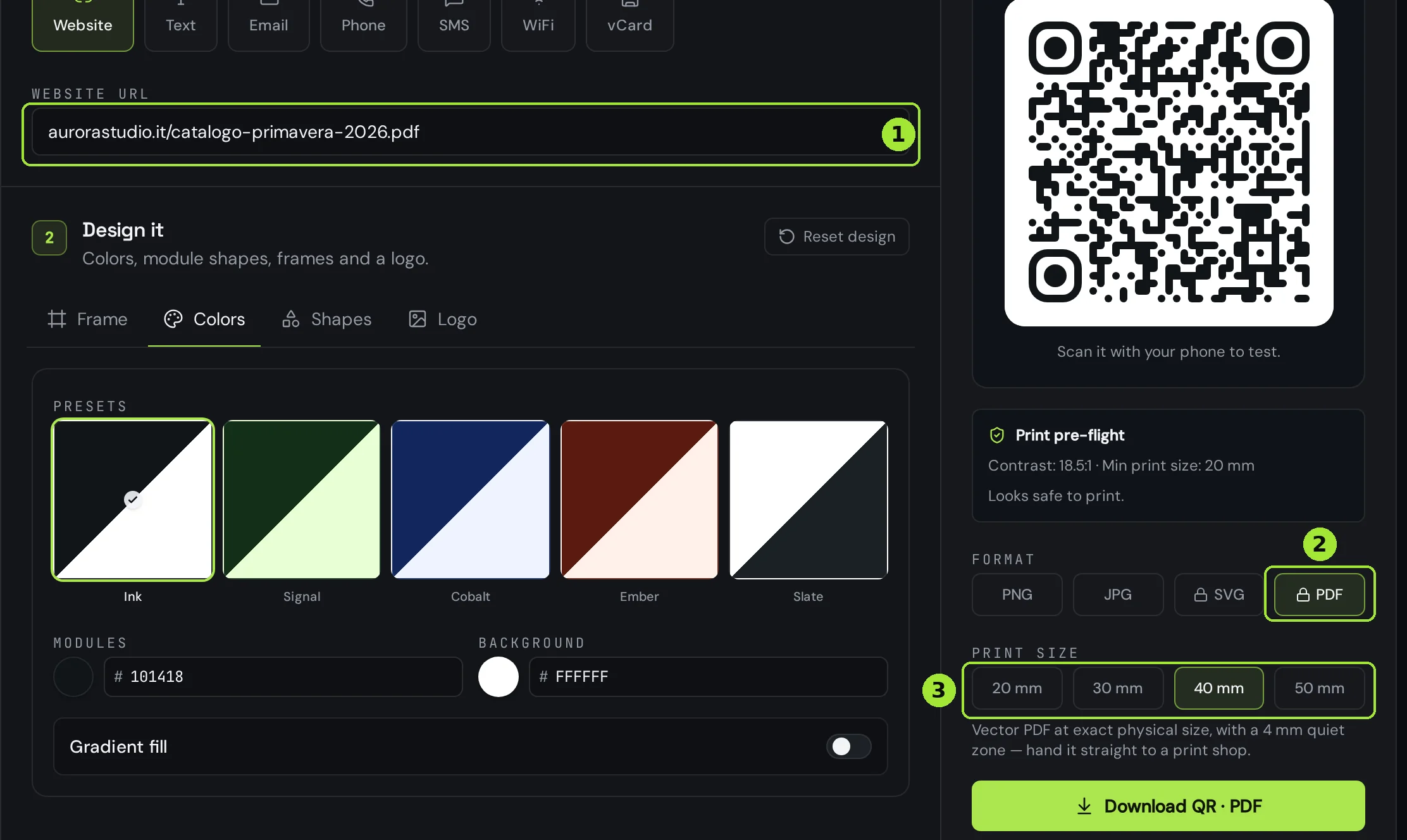
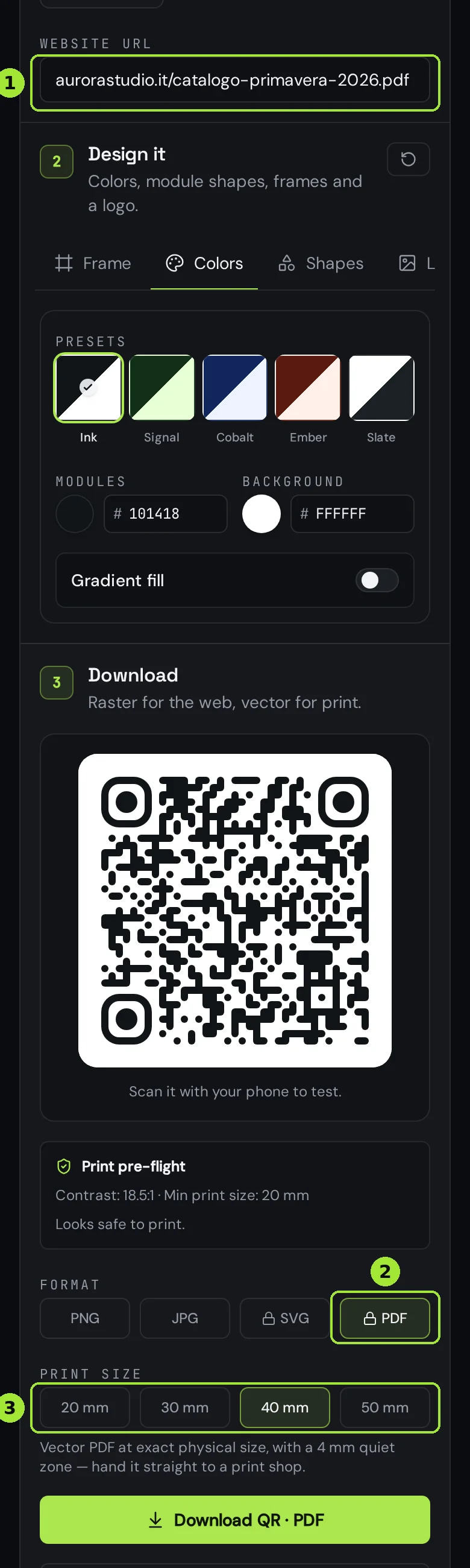
Paste the address of the PDF — or of the page hosting it — into the website field of the generator. The preview updates as you type, and the pre-flight panel tells you the contrast ratio and the minimum size the code can be printed at, so you find out now rather than after the print run.
Step 4: export it at the size it will be printed
For screens, PNG is fine. For anything going to a printer, choose PDF and then the physical size: 20, 30, 40 or 50 mm. You get a vector file at exactly that size with a 4 mm quiet zone already around the code, which is what a print shop needs — no scaling, no guessing at margins, no blurry upscaled pixels. SVG and PDF exports are part of the paid plans; PNG and JPG are free.
- Under 20 mm the code becomes unreliable on cheap paper and older phone cameras — go up a size rather than down.
- Keep the quiet zone empty: no text, no border, no photo bleeding into it.
- Dark code on a light background. Inverted codes are the single most common reason a scan fails.
Step 5: test the whole journey, not just the scan
Scan the printed proof with one iPhone and one Android, on mobile data rather than office Wi-Fi. Check that the PDF opens rather than downloading into a folder the visitor can't find, and check its weight: a 30 MB scanned brochure is a scan that gets abandoned on a train. Export at screen resolution and keep it under about 5 MB.
Frequent questions
- Can a QR code contain the PDF itself?
- No. The maximum a QR code can hold is a few thousand characters, so the document has to live at a web address and the code carries the link to it.
- Can I change the PDF without printing a new code?
- Yes, in two ways: keep the code pointing at a hosted page and upload a new file to it, or use a dynamic code and change its destination. Both leave the printed code untouched.
- Does a Google Drive link work?
- It scans, but visitors often land on a Drive preview or a sign-in prompt, and the link breaks if sharing settings change. A page you control is a better destination for anything printed.
- How big can the PDF be?
- The file block on a hosted page accepts up to 20 MB. In practice keep it under about 5 MB: people scan on mobile data and abandon slow downloads.
- Which download format should I give the printer?
- PDF at the physical size you need — 20, 30, 40 or 50 mm. It is vector, so it stays sharp at any size, and it already includes the 4 mm quiet zone around the code.
- Can I see how many people opened the PDF?
- With a dynamic code, yes: every scan is recorded with the time, the coarse country and the device type. A static code pointing straight at a file gives you nothing.
Next steps
- Change where a printed QR code pointsThe single feature people buy dynamic codes for: update the link, keep the print.
- What size should a QR code be for print?The short answer is one tenth of the reading distance — but payload length, quiet zone and file format decide whether that size actually scans. Here is the full method, with a print-ready export at the end.
- How to create a QR code for a restaurant menuLink to a page you control, print it at 25 mm on the table, and change the menu later without reprinting anything.
In-depth guides
- Static vs dynamic QR codes: the definitive guideThe difference isn't a marketing tier, it's a difference in what is physically encoded in the pixels — and it decides whether you can ever change the destination.
- How to print QR codes: size, format and best practicesPrinting a QR code is not just about dropping a PNG into a layout. Format, size, contrast and material all decide whether the code scans reliably.
- QR codes for restaurants: from menu to reviewsA practical setup for restaurant QR codes that covers the menu, guest WiFi and post-meal reviews without reprinting every season.